n8n has a strange failure mode. The tool is free, the editor is genuinely friendly, and yet most agencies who install it never ship a single workflow. Someone spins up an instance on a Tuesday, drags two nodes around, and by Friday the tab is closed for good.
The blocker isn't technical. It's the blank canvas — the same wall as an empty chat window: you know automation is possible, you just don't have a first real workflow worth building. Template libraries don't fix that, because five thousand anonymous JSON files are just a second blank canvas with extra steps.
What fixes it is a short list of real jobs — recurring, boring, occasionally expensive jobs — worth automating this week. This article is that list: all 24 workflows I build and run for agency clients, grouped the way the pack groups them, each explained in enough detail that you can rebuild it yourself on a free n8n instance. Eight of them are shown as their actual canvases, rendered from the real files.
Workflows 1–12
The core twelve: day-to-day agency jobs
Onboarding, reporting, monitoring — the recurring agency chores that otherwise live in someone's head. Each of these follows the same basic shape: a trigger, a data source, a bit of glue, and a message where you'll actually see it. Most deliver to Telegram; swap that one node for Slack, email, or Teams and nothing else changes.
01Form → Sheet → Notification (Lead Capture, No CRM)
A hosted n8n form — name, email, message — appends every submission to a Google Sheet and pings you on Telegram the moment it lands. That turns any embeddable form into a lightweight lead system with no CRM subscription. At three working nodes it's also the best first build on this list: trigger, storage, notification — the shape almost everything below repeats.
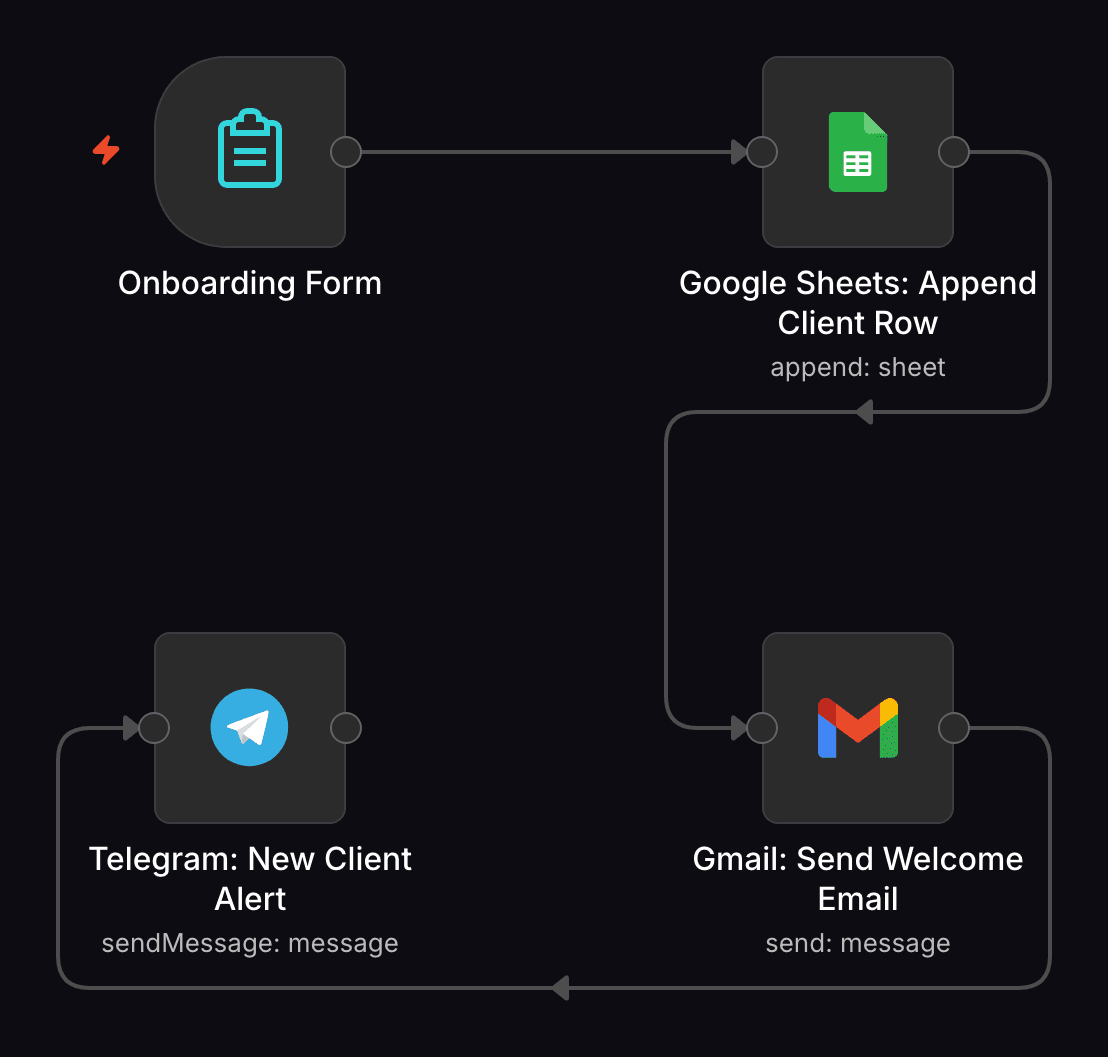
02New Client Onboarding Notifier
One form submission does three things at once: logs the new client to a spreadsheet, sends them a welcome email, and pings your team on Telegram. It's the smallest version of the fan-out pattern that the reference build at the end of this article takes to its conclusion — start here, graduate there.
03Google Review Request Nudge
Once a day it scans a customer sheet, finds anyone whose job was done exactly three days ago (the offset is one filter setting) and who hasn't been asked yet, emails them a review request, and marks the row done so nobody gets asked twice. Steady Google reviews without anyone on the team having to remember to ask.
04Unread Inbox Digest → Telegram
Once a day, everything sitting unread in Gmail arrives as a single Telegram summary — sender, subject, snippet. You triage in two minutes instead of opening the inbox and drowning in it.
05Inbox Zero Label Helper
Watches Gmail for new mail and routes it to labels through keyword rules in a Switch node: subject contains “Invoice” → Finance, “Newsletter” → Read Later. No match means no label and no error — it fails quiet, which is exactly what you want from a sorting robot.
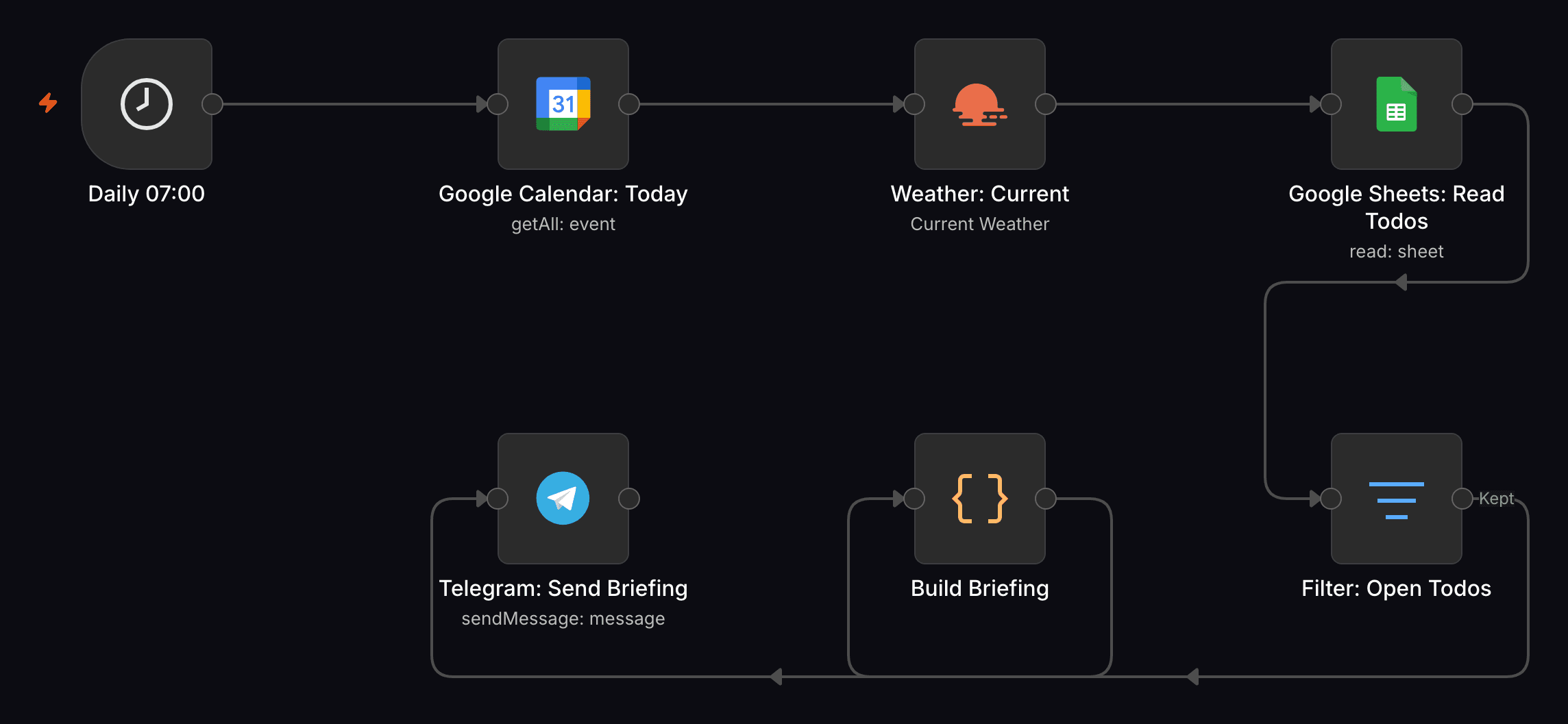
06Daily Briefing — Calendar + Weather + To-Dos
Every morning it merges three sources — today's calendar events, current weather for your city, and the open rows of a to-do sheet — into one Telegram message. It's the workflow that teaches you n8n's Merge node, and the one clients ask about the moment they see it running.
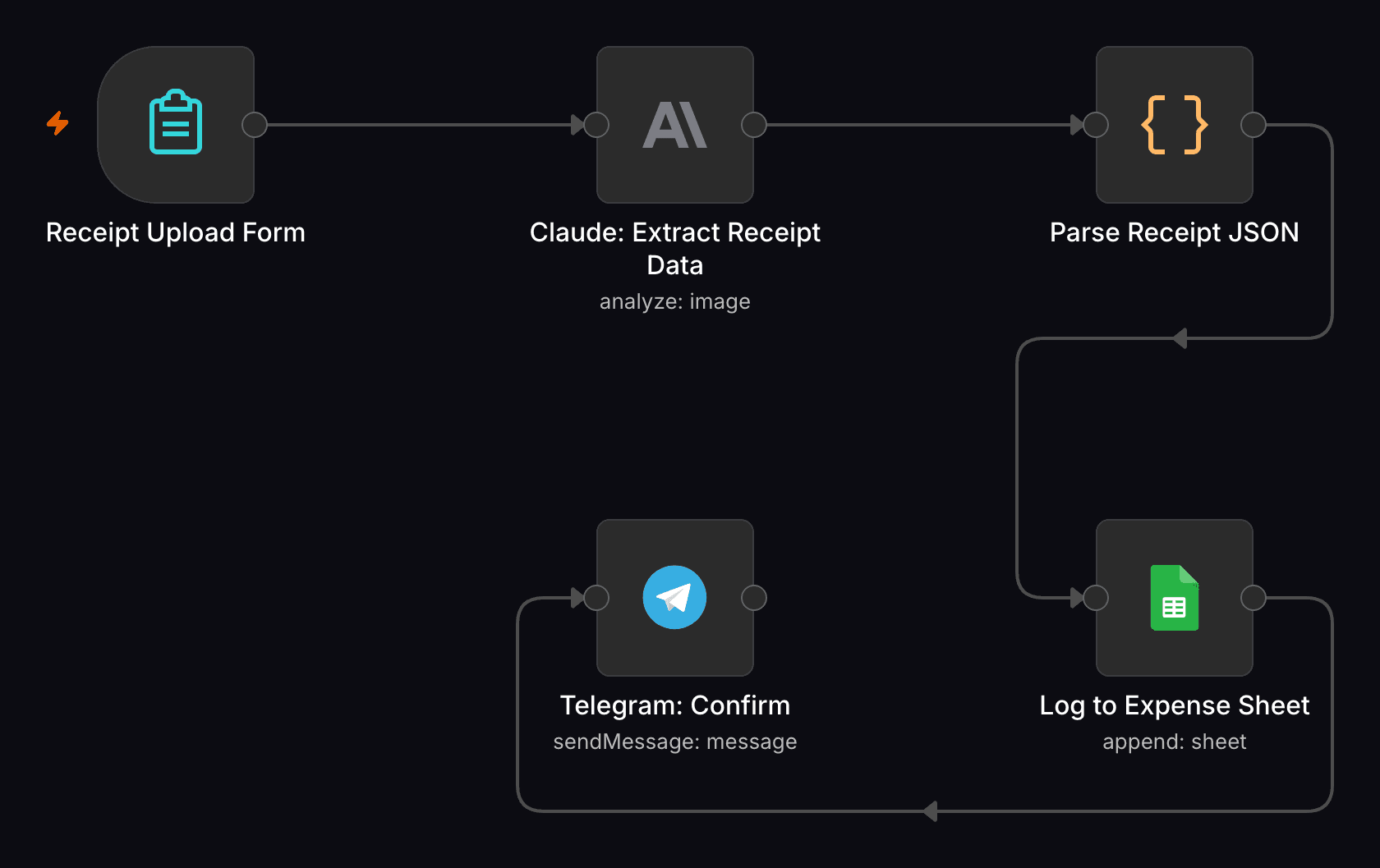
07Receipt → Expense Sheet Auto-Logger
Upload a receipt photo through a hosted n8n form, and Claude's vision reads vendor, amount, date, and category off the image; a Code node parses that into clean fields and appends the row to a Google Sheet, with a Telegram confirmation so you know it worked. Bookkeeping prep goes from a shoebox of paper to a photo per receipt.
08Email Campaign Performance Digest
Daily, it pulls sent-campaign and automation stats from the MailerLite API and upserts one snapshot row per campaign into a Supabase table. Opens, clicks, and unsubscribes accumulate as a time series you own, instead of numbers you visit in a dashboard.
09Social Post Scheduler Lite (Sheet → X/Twitter)
Queue a week of posts in a spreadsheet — text, scheduled time, status — and the workflow posts each one to X once its time has passed, then marks the row posted so nothing repeats. A scheduling-tool subscription replaced by a sheet you already know how to use.
10YouTube Channel Digest → Telegram
Watches any channel's public RSS feed and pushes one Telegram message per new upload — title and link, no YouTube API key required. Point it at competitors, at clients, or at your own channel.
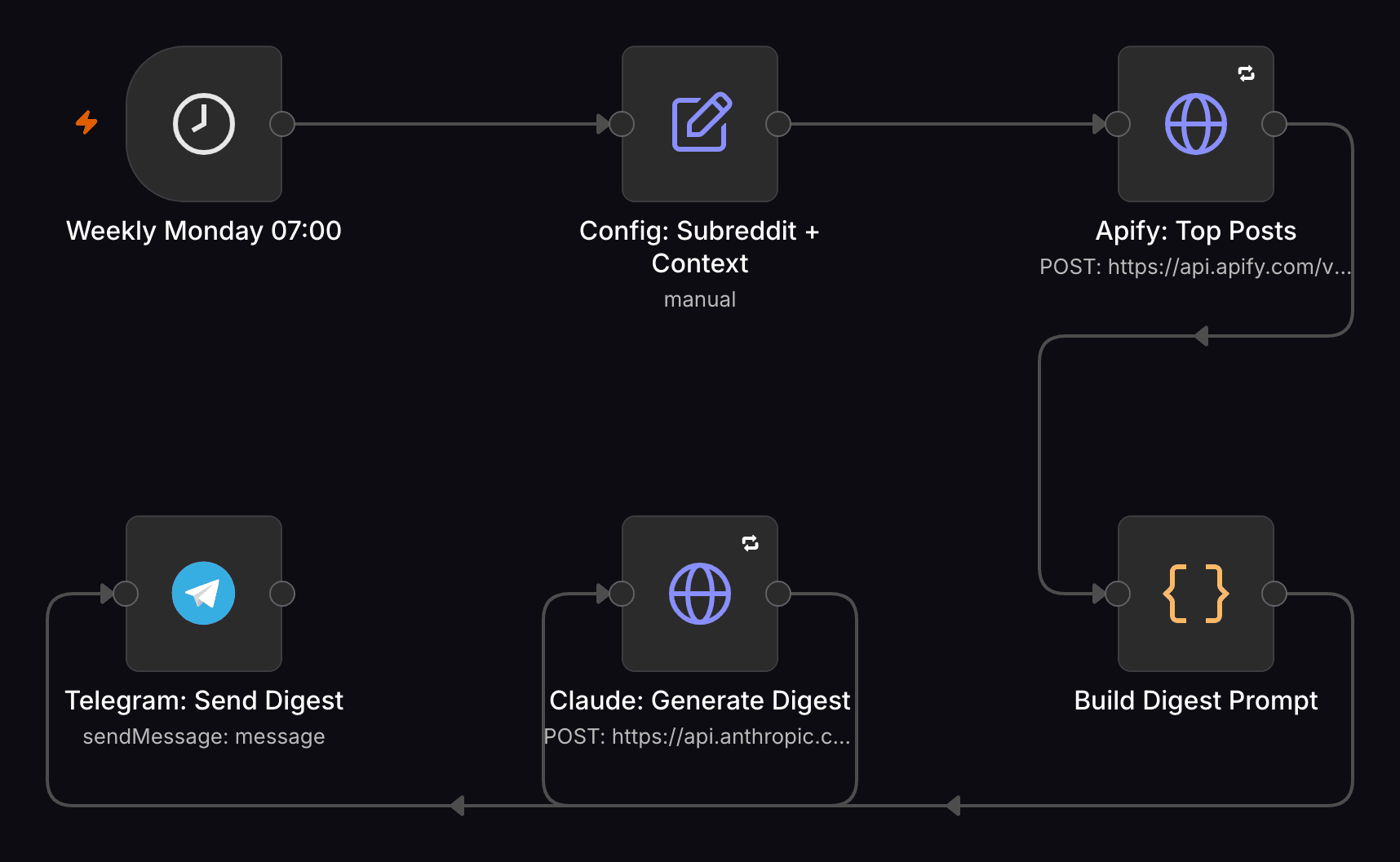
11Reddit Insight Digest → Telegram
Weekly, it pulls a subreddit's top posts through a public Apify scraper (no Reddit API key), has Claude summarize them into top posts, key learnings, and ideas for your own business, and sends the digest to Telegram. Market research on a schedule — the same AI-plus-automation pattern as the receipt logger, pointed outward.
12Birthday & Anniversary Reminder
Checks a contact sheet every morning and sends a same-day Telegram heads-up when a client's birthday or anniversary comes up. The smallest workflow in the pack — and the kind of touch a client remembers longer than a quarterly report.
Workflows 13–19
Money & health: KPIs, invoices, uptime, backups
The workflows that watch things while you sleep: money going out, money coming in, sites staying up, backups actually existing. These are the ones that pay for themselves in a single caught incident.
13Website Uptime Check → Telegram
Every 15 minutes it checks up to three URLs in parallel and tells you exactly which one went down — homepage fine, checkout dead. Silent when everything is healthy, so when it does speak, you listen.
14Multi-Step Funnel & Website Health Monitor
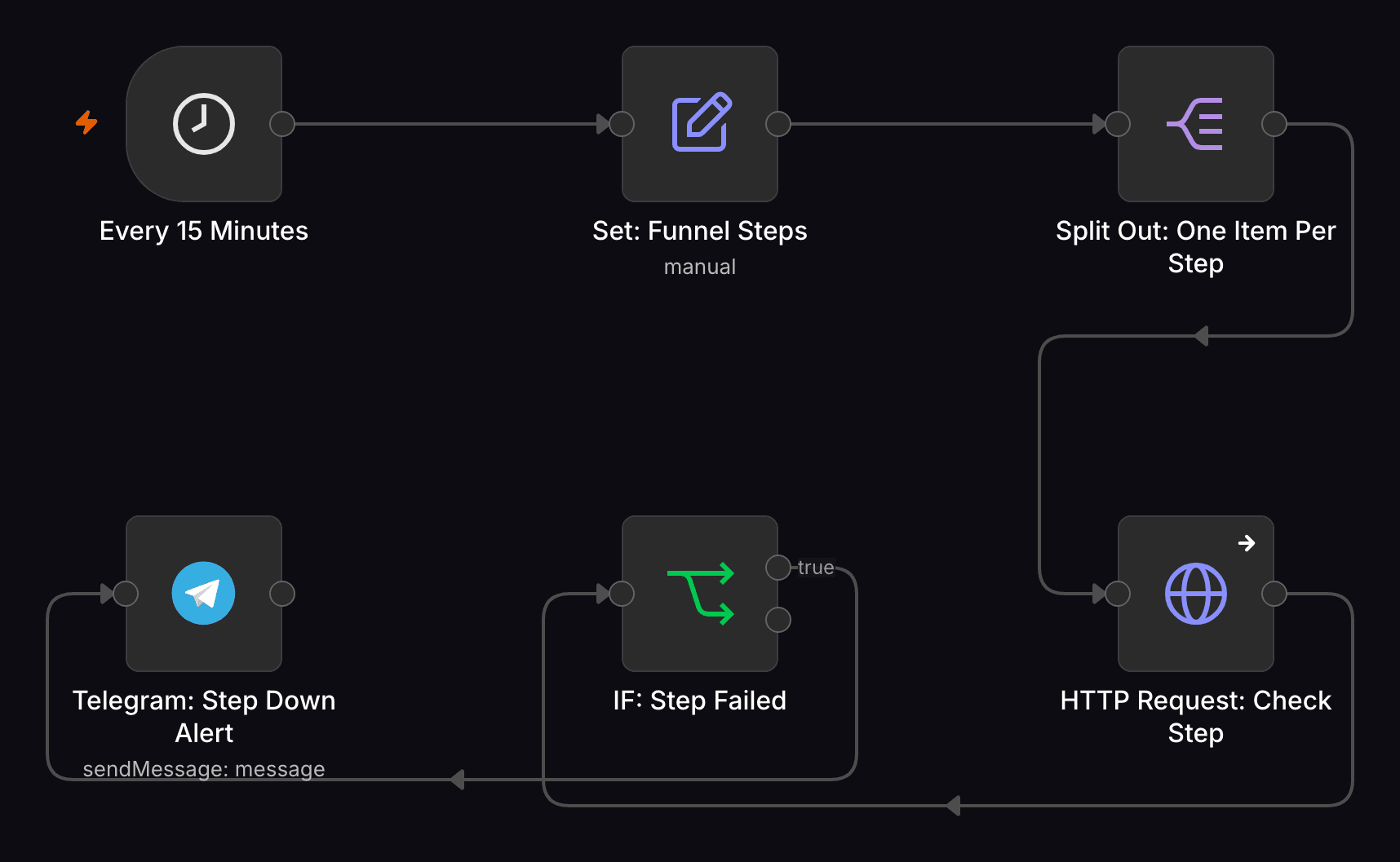
The uptime check's bigger sibling: a named list of funnel steps — homepage, checkout, thank-you page — each checked individually every 15 minutes, with the alert naming the exact step that broke. When a client's checkout dies at 2 a.m., you hear it from Telegram, not from the client.
15Invoice / Payment Due Reminder
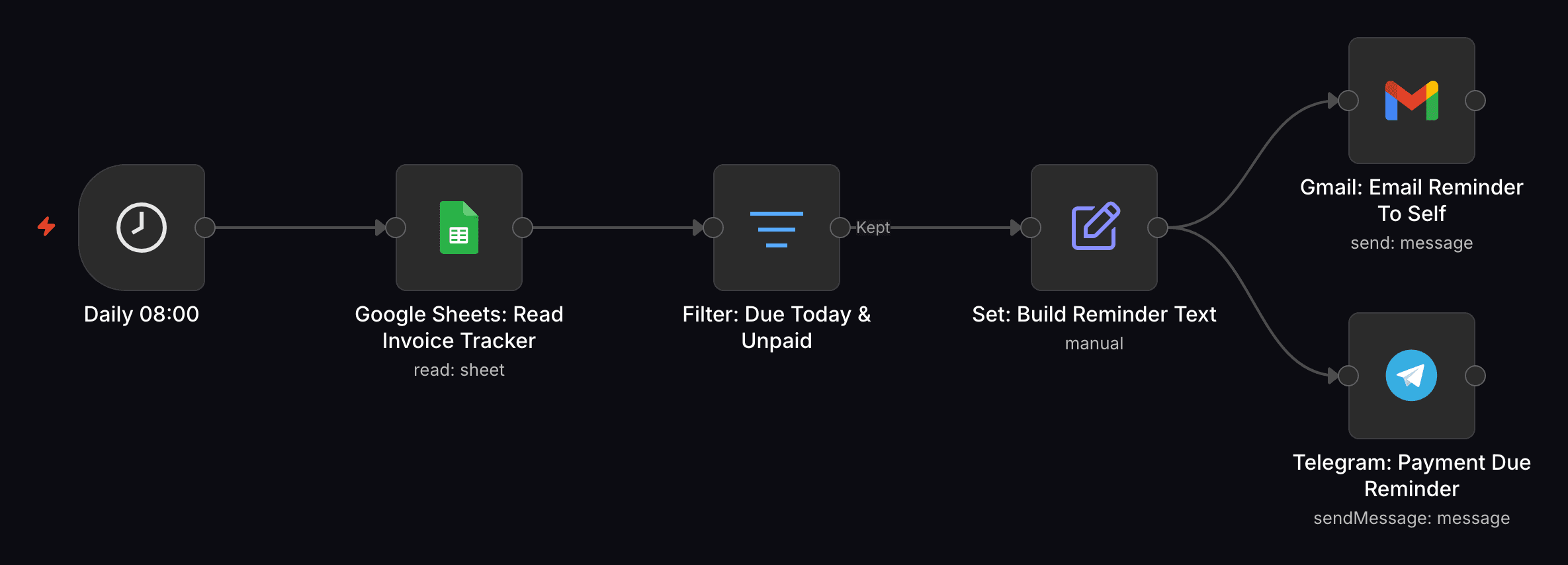
Reads an invoice sheet every morning and reminds you — by email and Telegram — the day a payment is due and still unpaid. Deliberately, nothing goes to the customer automatically: it's an early-warning system so you chase personally, not an autodialer that torches a client relationship.
16Weekly KPI Digest
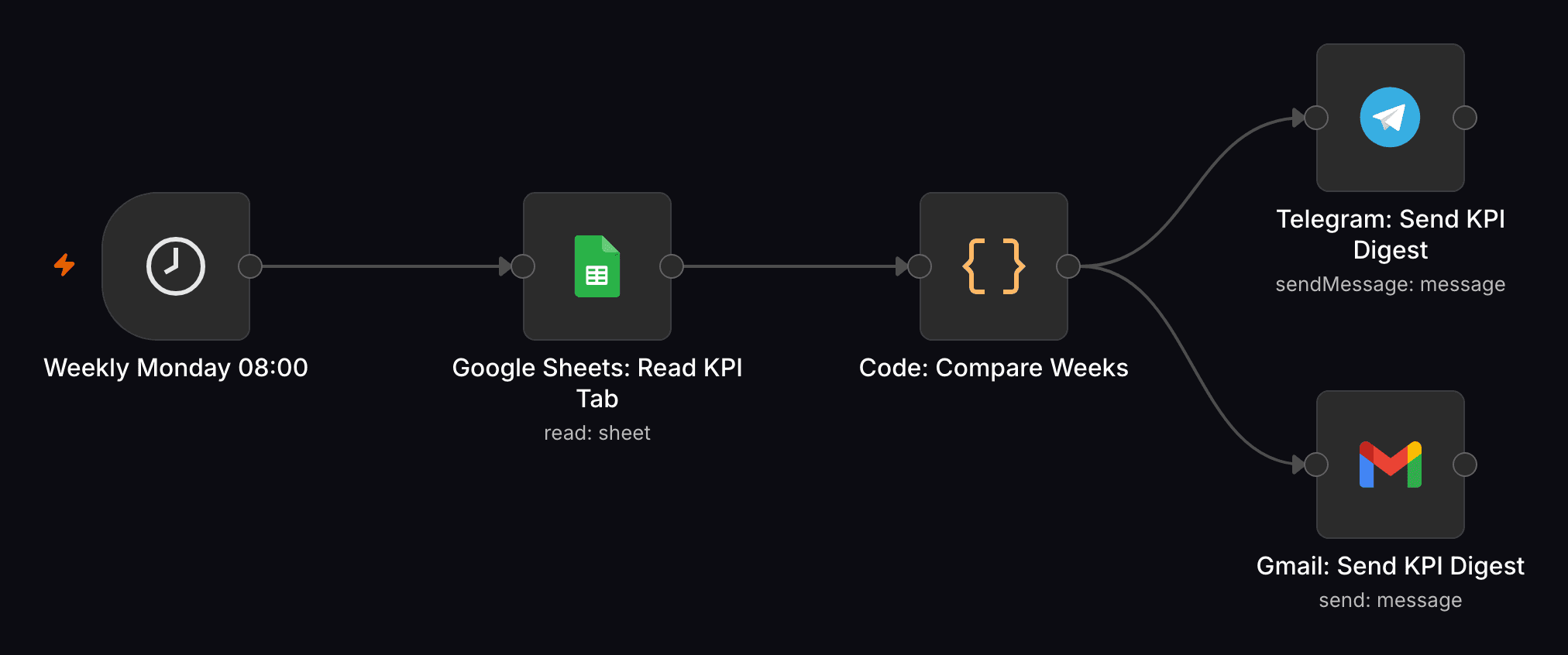
Weekly, it reads a one-row-per-week KPI sheet, compares the latest row to the previous one, and sends a Telegram and email digest with an up or down arrow per number. The Monday-morning question — are we growing? — answered before you ask it.
17Backup Reminder & Verification
Every Friday afternoon it looks at your Google Drive backup folder, finds the most recently modified file, and tells you on Telegram whether the backup is fresh, stale, or missing. It verifies that a backup exists instead of hoping the cron job ran — a distinction you only appreciate once.
18Price Watcher — Product Page Price Alert
Checks a product page on a schedule, pulls the price out with a CSS selector, and pings Telegram the moment it drops to or below your target. A plain HTTP GET — no scraping API, no subscription — as useful for procurement as for catching a restock discount.
19Crypto/Stock Price Threshold Alert
Polls CoinGecko's free public API every 15 minutes and alerts you the moment a coin crosses your target in the direction you set. Swap the HTTP node for any market-data provider and the same shape watches stocks.
Workflows 20–23
The Microsoft 365 variants
Four of the workflows above, rebuilt for teams that live in Outlook and Excel instead of Gmail and Sheets. One honest note, which also sits as a sticky note inside the workflows themselves: if a client is fully inside Microsoft 365, Power Automate is Microsoft's native alternative. These variants earn their place when you want every automation in one n8n instance next to everything else — mixed stacks, multiple clients, one canvas.
20Unread Inbox Digest — Microsoft 365 (Outlook)
The daily unread-mail digest with Outlook's unread filter in place of Gmail. Same two-minute triage, same single Telegram message.
21Daily Briefing — Microsoft 365 (Outlook + Excel)
Outlook Calendar replaces Google Calendar, and an Excel 365 table replaces the to-do sheet — the table has to be a real Excel Table object, not a plain range, and the in-workflow sticky note walks through exactly that. Weather and Telegram stay unchanged.
22Google Review Request Nudge — Microsoft 365 (Outlook + Excel)
The review nudge with an Excel table and Outlook send in place of Sheets and Gmail — it still asks for a Google review; only the plumbing is Microsoft. It also documents a real platform limitation: Excel's n8n node can't update a row by matching a column, so the workflow computes each row's sheet position and writes the done-flag directly — flagged in a sticky note rather than left silently fragile.
23Receipt → Expense Table Auto-Logger — Microsoft 365 (Excel)
The same Claude-vision receipt extraction as the Google version, with an Excel 365 table as the destination. Photo in, clean expense row out, Telegram confirmation back.
Workflow 24 — the one the rest build toward
The reference build: payment to kickoff
The last workflow in the pack is the one the other 23 are building toward, and the one behind my own agency's onboarding: Client Onboarding — Payment to Kickoff (Agency-Grade Template). The moment a client's payment lands, the entire onboarding sequence fires without anyone touching a keyboard.
Here's the full run. A webhook catches the payment event, and a Code node extracts the customer data into clean fields. Then the canvas splits into three branches that run in parallel. The first adds the client to a MailerLite welcome group, so the onboarding email sequence starts on its own. The second creates a ClickUp task for the project, then fans a five-item checklist out into individual checklist items — a Code node splits the list, and ClickUp creates them one by one. The third has Claude write a personalized kickoff note from the customer data and lands it on a dedicated Notion page. A Merge node waits until ClickUp and Notion are both done — and only then does the team get one Telegram message: new client, with links to everything that was just created.
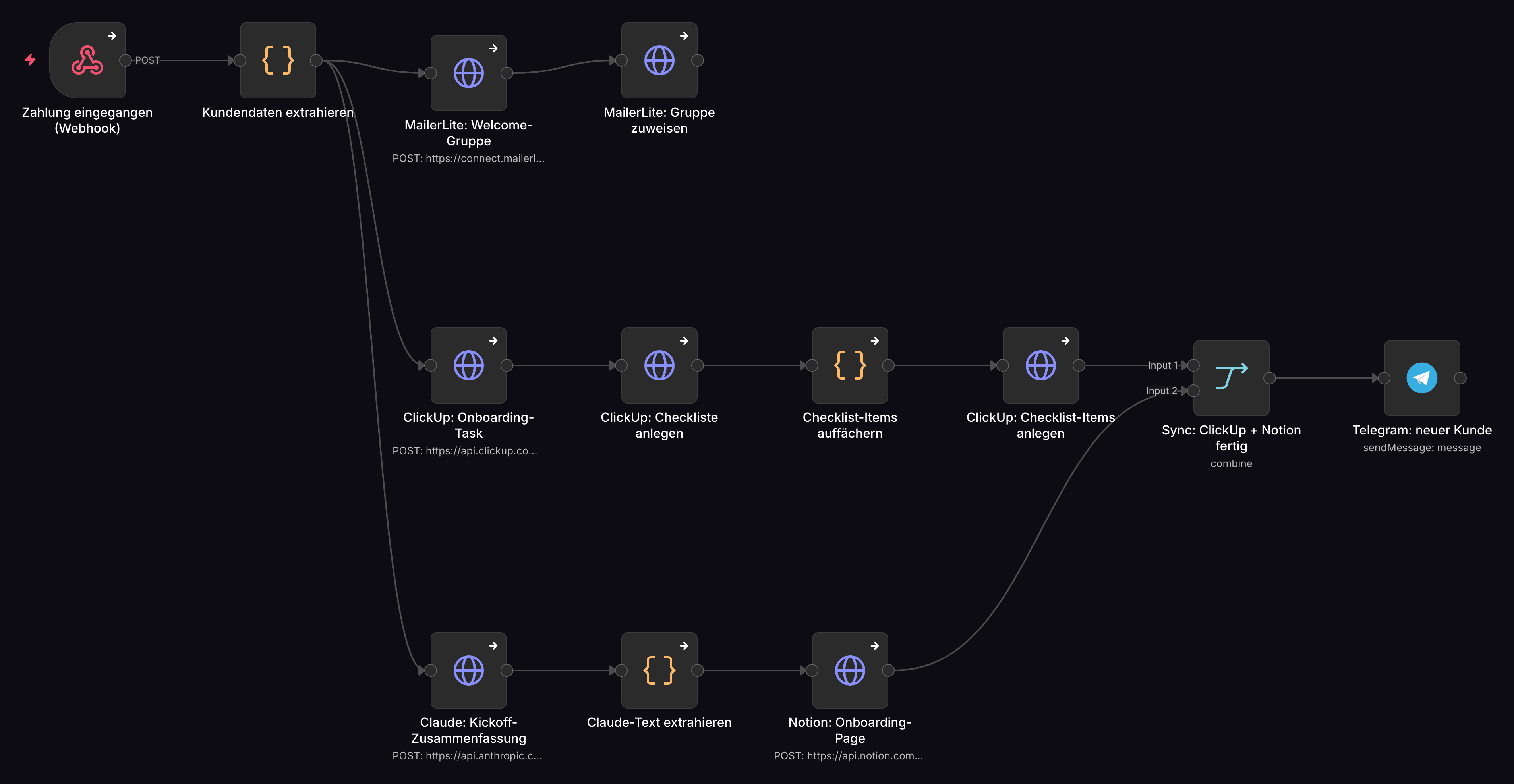
On the canvas that's 18 nodes — 13 doing the work and five sticky notes explaining it, because a workflow nobody can read six months later is a liability, not an asset. And yes, the node labels in the screenshot are German: this canvas is the template behind my own agency's onboarding, rendered from the actual file, not a mockup rebuilt for a blog post. The version in the pack carries English documentation and placeholders where the credentials go.
If you study one workflow in this article, make it this one — not for what it does, but for its anatomy. One trigger. One normalization step. Parallel branches, one per system that needs to know. A merge that waits for the slow branches. One human-facing notification at the end. That is the shape of almost every serious business automation you will ever build; the other 23 workflows here are the same pattern with fewer branches. Learn to see it, and the blank canvas stops being blank.
It also ships the way everything above should ship: run it manually against a test payment first, look at the output, then activate. Verify, then trust.
Two honest paths
Steal them, or import them
Everything above is deliberately enough to rebuild any of these yourself. n8n is free, the descriptions name the triggers, the nodes, and the failure modes, and if you build them by hand you'll learn more along the way. That's a real path, and for some readers the better one.
The other path: the same 24 workflows exist as The Workflow Pack — 24 ready-to-import n8n workflows, the same ones I deploy for agency clients, every one my own build. Access to a private GitHub repo of ready-to-import workflow files. Pay once, it's yours, including future additions to the pack. Every file imports with placeholder credentials and a sticky note telling you exactly what to swap.
The Workflow Pack
30-day money-back · no subscription · works with your n8n